This is my first actual usage of volatility tool. I prefer to use the Volatility3 tool to solve this forensics challenge. The link to download this tool is:
git clone https://github.com/volatilityfoundation/volatility3.git
cd volatility3
python3 setup.py install
python3 vol.py —h
Let’s solve the machine solving the asked queries:
- What is the name of the suspicious process?
- So firstly I need to have info about the OS where that malicious file is operating. Volatility provide us the simple command to find those info.
python3 vol.py -f ../../Documents/CyberDefenders/Redline/MemoryDump.mem isfinfoAND For finding the windows information use:
windows.info
So it clearly shows us that the file is executing in the windows OS. Now, we will use all the windows plugins provided by the volatility3.
Using the documentation I found the cmd for searching the suspicious process as:
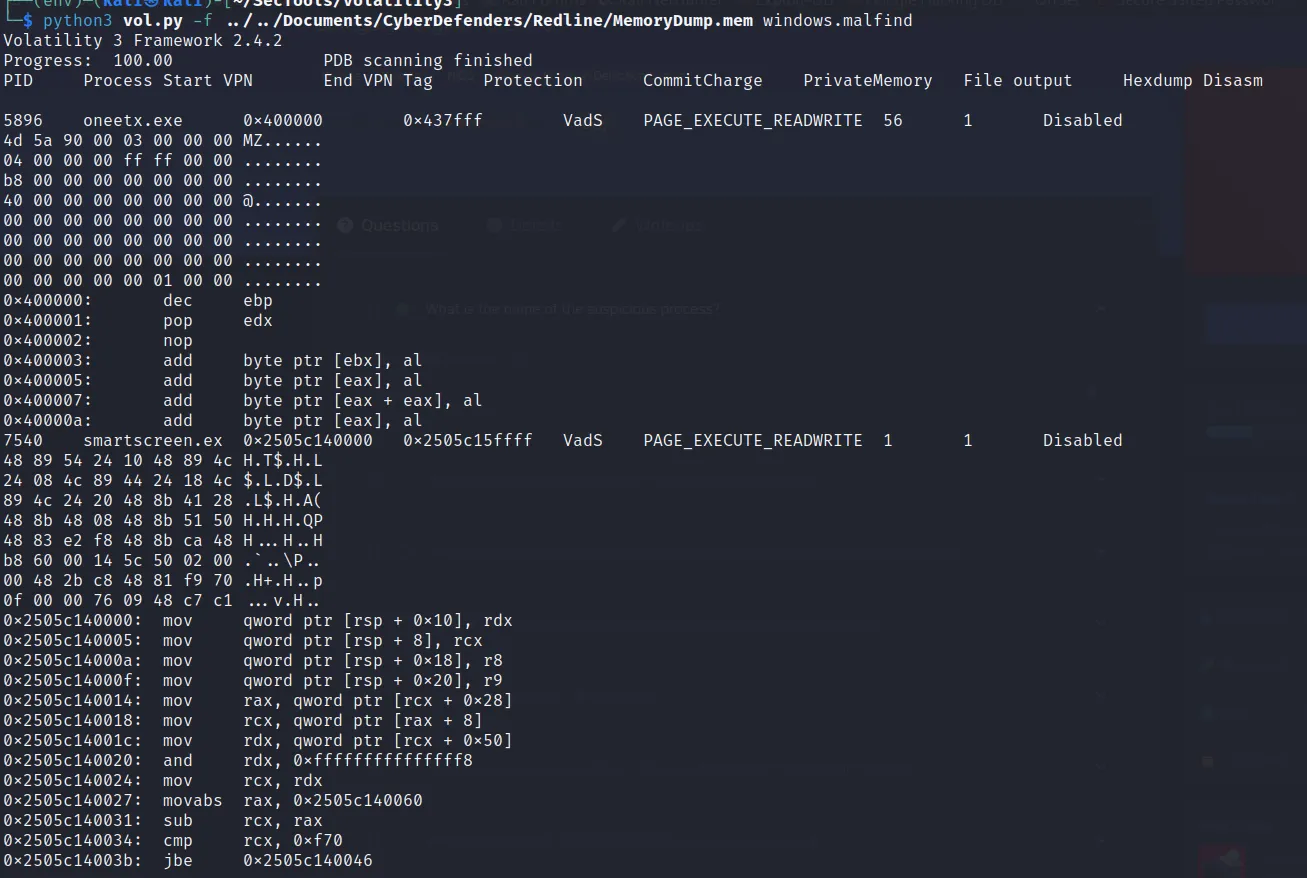 → oneetx.exe
 - What is the child process name of the suspicious process?
- I used chatGPT for actual command in search of child process. Using ‘pstree’ along with the pid of the malicious process we got the child process.

→ rundll32.exe
- What is the memory protection applied to the suspicious process memory region?
- Here, I used the ‘vadinfo’ plugin. VAD stands for Virtual Address Descriptors. It is used to describe the memory allocation and protection attributes for a specific region of virtual memory within a process. OR you can just look at the “windows.malfind” on question 1.
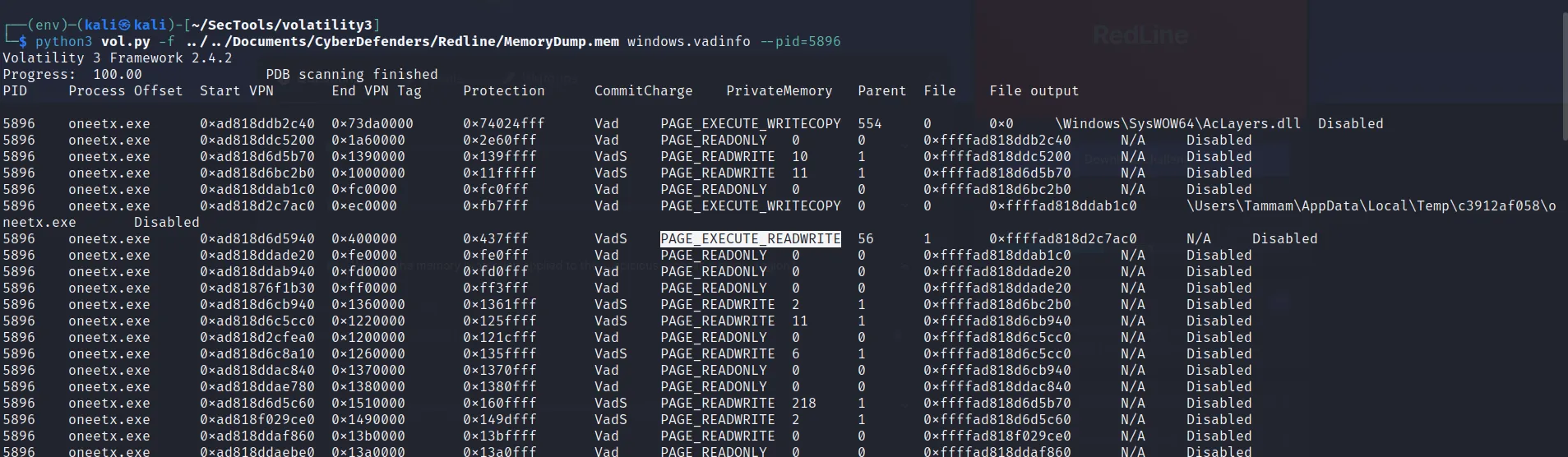
→ PAGE_EXECUTE_READWRITE
- What is the name of the process responsible for the VPN connection?
- Here I first see the list of process running using “windows.pslist” plugin. There I saw few processes running shown on “wow64” column as True. While using that command I found that “tun2socks.exe” process seems to be used as VPN connection [via ChatGPT]. When I use the “pid” of that process and filter its subtree using “windows.pstree” plugin then I found the common process.

Now there’s “tun2socks.exe” which seems to use VPN connection. While looking out the sub-process we have:

And here we find the process running on machine. Hence we get the actual process using VPN.
→ Outline.exe
- What is the attacker’s IP address?
- As like above plugin “windows.netscan” I can get all the connection. While making vpn connection the malware is executed from the foreign address and that address lies while running “tun2socks.exe” process. During that connection oneetx.exe is executed from an ip address which is the attacker’s IP address. And after executing that malware the connection as well as the VPN get closed.
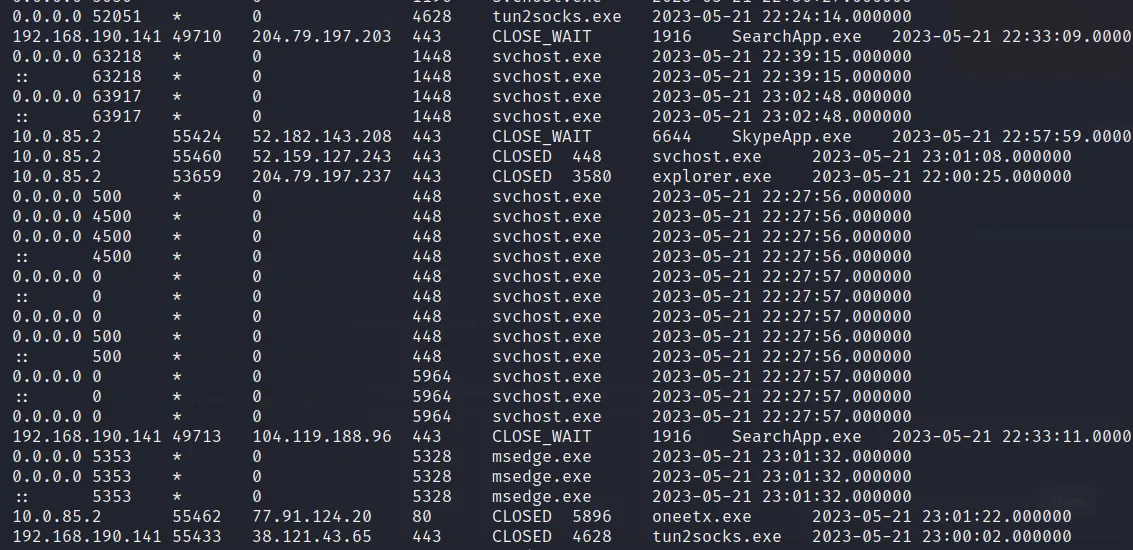
→ 77.91.124.20
- Based on the previous artifacts. What is the name of the malware family?
- To answer this, I just googled the oneetx.exe malware,read the documentation and got the answer as:
→ Readline Stealer
- What is the full URL of the PHP file that the attacker visited?
- For this question I explored several method but can’t find any idea. I was just eploring with the acutal mem file and while I just playing with the grep command , I found the output as:
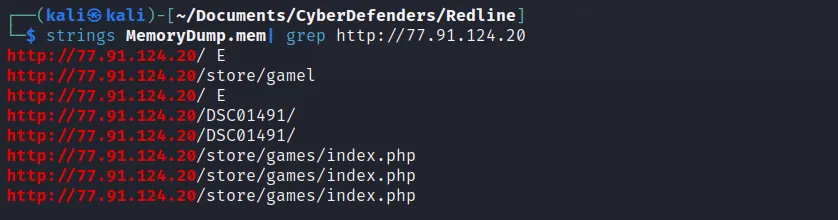
→ http://77.91.124.20/store/games/index.php
- What is the full path of the malicious executable?
- We know the malicious process and further we can find its full path searching out that process within the mem file as:

→ C:\Users\Tammam\AppData\Local\Temp\c3912af058\oneetx.exe
This writeup has also been published by CyberDefender